
Author: Kiran Manoj
Published: 03 Mar 2023
Description: Debugging Strange Android Bluetooth Connection Issues
BLE Connectivity Issues on Android (Feb 27 - Mar 3)
This week we ran into a very strange issue when trying to connect the ring to Android devices. The ring would connect to the Android phone, but then mysteriously after approximately 5 seconds it would disconnect. When the ring connected to iPhones, this issue did not occur which was very strange. We tested this on 3 different Android phones: Samsung Galaxy S9+, Samsung Galaxy S21, Samsung Galaxy S5. This was to rule out the off chance that this issue was occurring due to a phone specific issue. As expected, the same error occurred on all 3 phones.
The next step was to debug the specific connection logs on the Android device which outline what was happening under the hood when the device was connecting to the smart ring via Bluetooth. We used Wireshark for this, which is a very popular network analyzer tool. The log file called bci_snoop.log was imported from the smartphone to a desktop computer running the Wireshark application. From these logs, we could see the network requests and timestamps of the BLE connection between the smartphone and ring. In the image below, the raw logs can be seen. A connection parameter update request is sent by the phone, and about 5 seconds later the phone terminates the connection with a disconnect request.
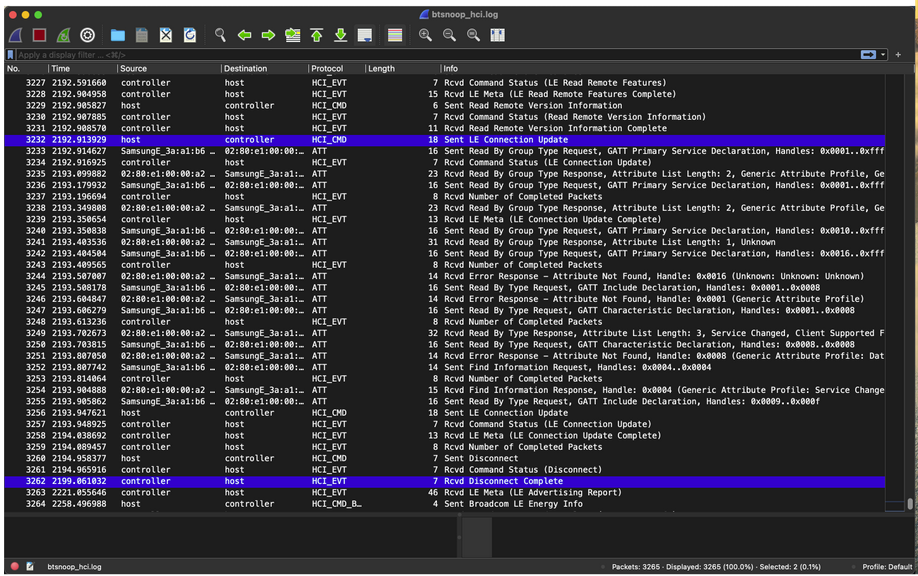 BLE log dump in wireshark
After many hours of debugging, we pinpointed the issue to be occurring from the firmware side on the smart ring. It turned out that the touch detection code was blocking the MCU from sending a response to the connection parameter update request that the Android phone sends. So, after 5 seconds the smartphone terminates the Bluetooth connection as specified by its timeout limit. Our solution was to update the firmware to wait for approximately 2 seconds after connecting to the smartphone to allow the connection parameter updates to be processed between ring and phone.